Switched On Curriculum - A Critical Review
- Published on
- •16 min read

Figure 1. Main Switched On Image from Webwise.
Introduction
On 5th March 2026, a new Digital Citizenship programme for 5th and 6th Class called Switched On was announced by the government's Online Safety Commissioner, Niamh Hodnett. Created by Webwise and supported by Coimisiún na Meán, the programme aims to "...empower primary pupils to become safe, smart and responsible digital citizens". The Switched On curriculum provides interactive educational content on a range of relevant topics, including "recognising misinformation and disinformation, staying secure online, managing screen time, and protecting personal information and privacy".
From the initial description of the course given in the announcement, Switched On appears to be a welcome addition to the primary school curriculum. In my previous article - Social Media Bans for children - Not a Panacea - I highlighted the fact that Australia had introduced their own ban on social media for under 16s before providing any details on the education the affected children would receive. I was critical of this approach, as enforcing a ban before providing the means by which to educate those directly affected is very much a case of putting the cart before the horse. Therefore, it was reassuring to see the Irish government clearly setting out their plans before any potential ban is brought in here.
After a full review of the content of the curriculum, my initial optimism has faded. I don't have confidence that Switched On adequately prepares children to become digital citizens in the way it is claimed. While there is a lot of useful information on a wide range of topics, I have doubts about how effective the lessons will be in fostering the types of safe and responsible behaviours we wish to instil. These doubts stem from three critical flaws: the curriculum lacks depth, provides no opportunities for practical application, and has no robust means of assessment. Rather than empowering primary school pupils, I fear it may provide a false sense of security to both them and their parents.
In this article, I critically review the Switched On programme. The purpose of the critical element is not to dismiss the programme or those who create it, but to assess where it succeeds, where it fails, and what could be improved. Independent reviews like this are an important component in stress testing these types of educational materials, especially when first released. It is also important for parents to have access to opinions from those on the outside - particularly experts in the area who may not agree with the original authors. To my knowledge, there is currently no other critical review like this for the Switched On programme. I hope the information and opinions found in this article can be helpful.
Contents
This review is structured as follows:
Curriculum Overview
The Switched On curriculum was created to "assist and support educators when teaching 5th and 6th class pupils how to be safe, responsible and competent digital citizens". It includes the following materials:
- An online learning platform (with printable homework worksheets)
- A 134-page Teacher Handbook
- Pre- and post-programme surveys
- Post-programme review form
The majority of the learning activities for students take place on the online platform. Students can access all the interactive content through a central dashboard (pictured below). The activities for each module include informative videos, explanations, a variety of exercises and additional take home worksheets.
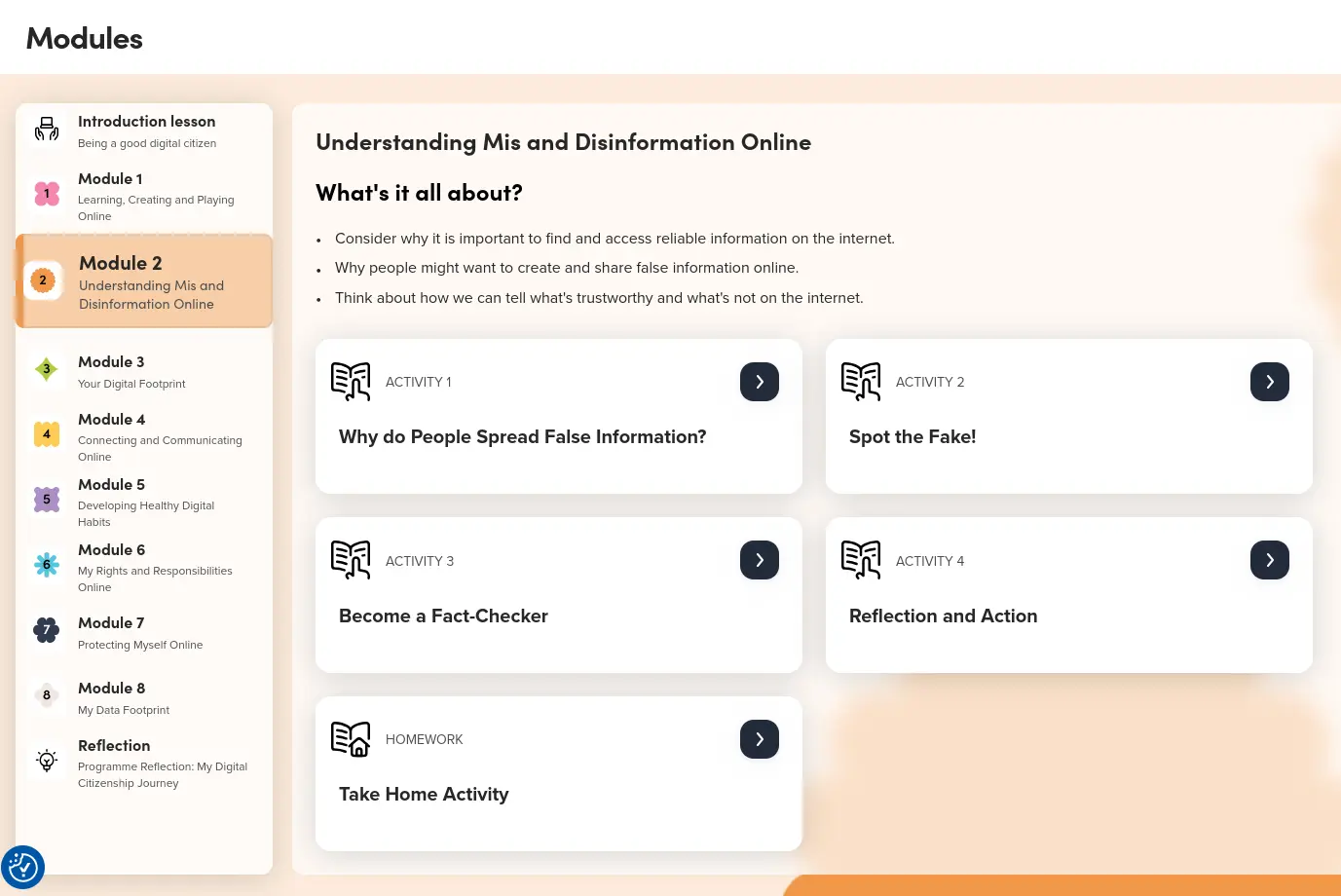 Figure 2: Dashboard for online activities
The Teacher Handbook runs parallel to the online course. It provides step-by-step guides on how to structure and carry out each lesson. The course consists of 8 lessons/modules in total:
- Learning, Creating and Playing Online
- Understanding Mis and Disinformation
- Your Digital Footprint
- Connecting and Communicating Online
- Developing Healthy Digital Habits
- My Rights and Responsibilities
- Protecting Myself Online
- My Data Footprint
Modules don't need to be taught sequentially, or even at all. Teachers are advised to "use their professional judgement and planning when selecting which modules and activities to teach". No guidance on time to be spent is provided, other than the advice not to complete all modules in one session. I would estimate each module would take approximately an hour to complete (but am happy to be corrected by any 5th or 6th class teachers out there who have used these resources).
At the start of each module in the Teacher Handbook, there are instructions to introduce the topic in class using examples, explain terminology, and generate a class discussion. Students can then use the online learning platform to do relevant activities (e.g. pictured drag and drop activity on mis and disinformation below).
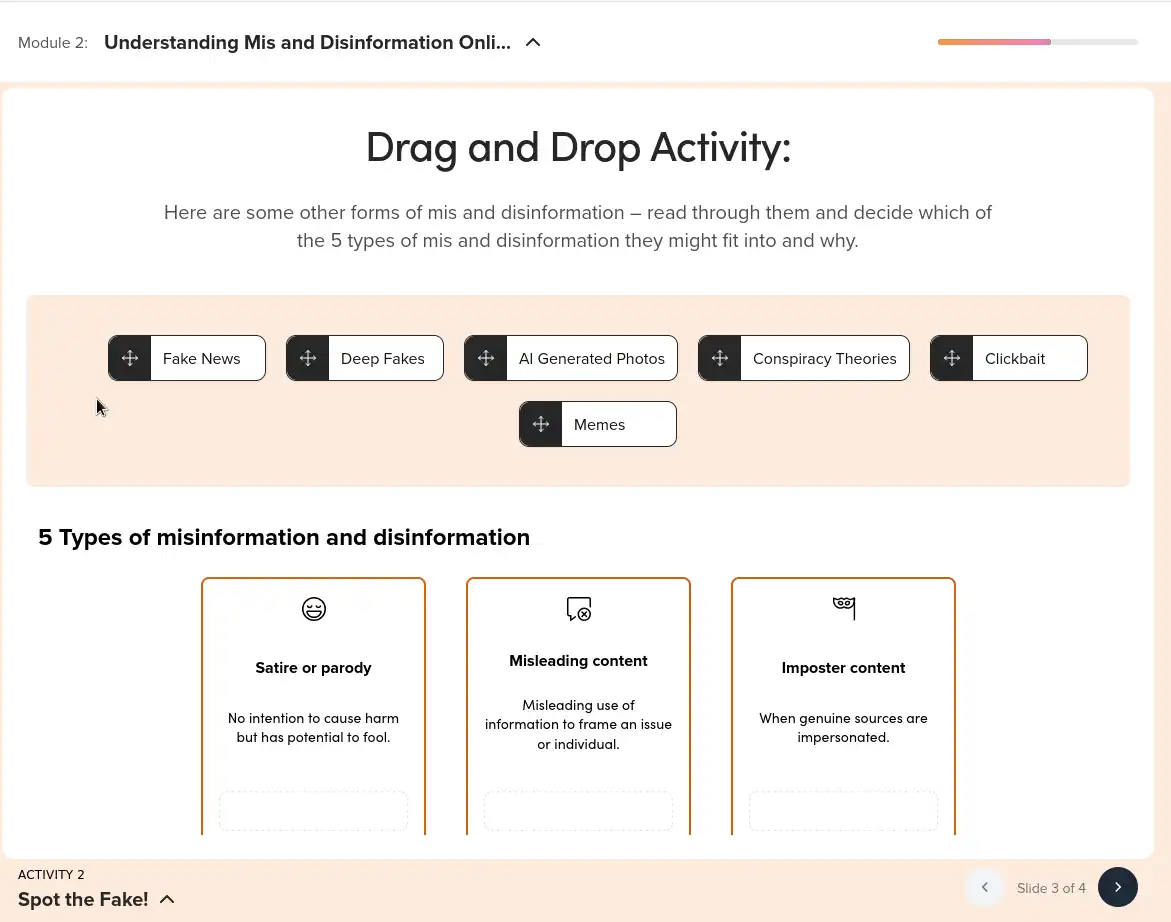
Figure 3: Drag and Drop activity from Module 2: Understanding Mis and Disinformation Online
At the end of each module, there are activity sheets and handouts for the students to complete at home with a parent/guardian.
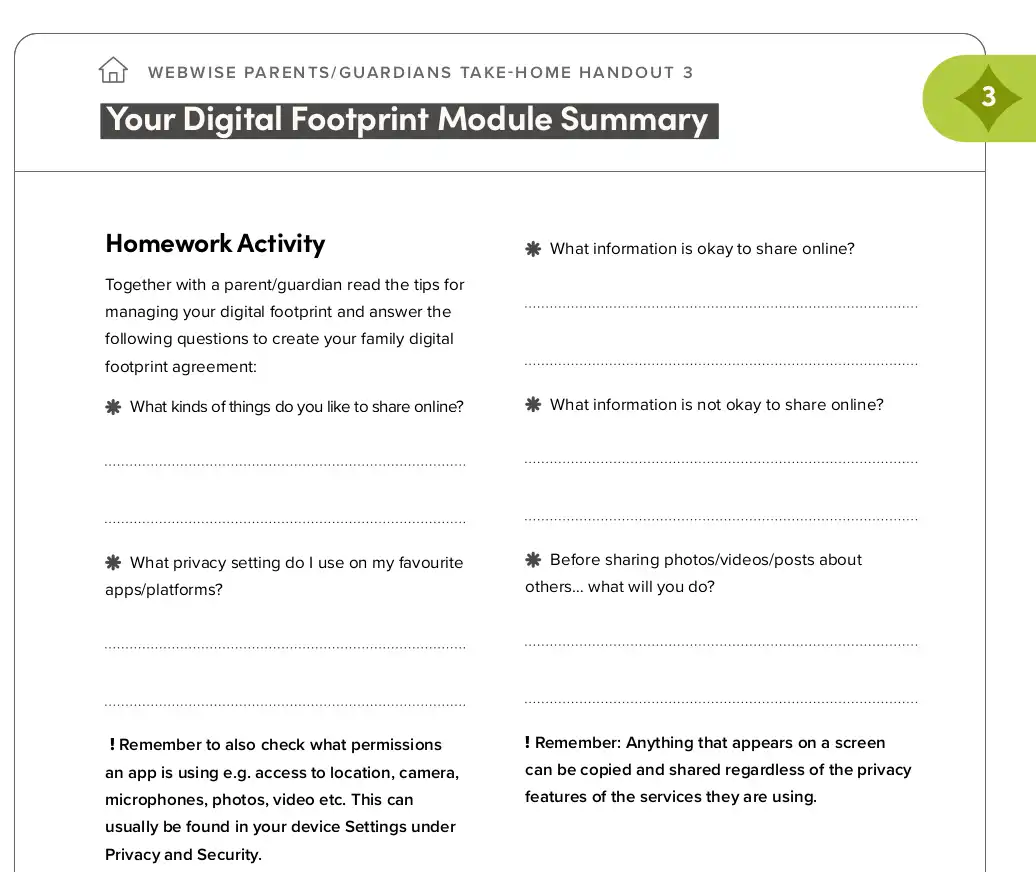
Figure 4: Homework Handout from Module 3: Digital Footprint.
Before and after the course, students are asked to fill out surveys to gauge their existing knowledge and measure progress on how their understanding has developed. A Programme Feedback form also gives students the opportunity to provide their own feedback on the course.
Overall, the course is very clear and easy to follow. The activities on the online protal are designed in such a way that many students could work through the course themselves with little guidance. The detailed Teacher Handbook provides enough information to enable teachers with little or no technical backgrounds to employ this course in their classes.
The Good
Much of the Switched On curriculum demonstrates careful and thoughtful design. Even simply the fact that this subject is being introduced before students enter secondary education is a positive in its own right. On the content specifically, I will highlight three areas that stood out to me as being of note. These three are not an exhaustive list; there is a lot of good, more than listed below, but I have kept it to three areas for the sake of brevity.
1. Inclusion of Modules on Digital and Data Footprint!
I have to immediately jump to my favourite part of the new curriculum - the inclusion of Digital and Data Footprint as modules. As I detailed in the FAQ, this is the area of most concern to me regarding my own children. Every action they take online will be stored and used to train algorithms to deliver content to keep them engaged, influence their opinion, and sell them products. If a girl happens to search for "diet tips" in her early forays online, she will be served content that appeals specifically to young girls anxious about their weight. If a boy asks an AI chatbot for help on how to get a girlfriend, he will be categorised as a young man with relationship insecurities and pushed content that will likely appeal. What is particularly frightening about this footprint is that it cannot be erased. It will be a part of their digital profile forever.
It is great to see Digital and Data Footprints covered in some detail is the Switched On curriculum. It is extremely important for every young person going online for the first time to understand that everything is being collected, including more data than most realise. One activity in Module 8 highlights that data is collected behind the scenes, without you being "fully aware"
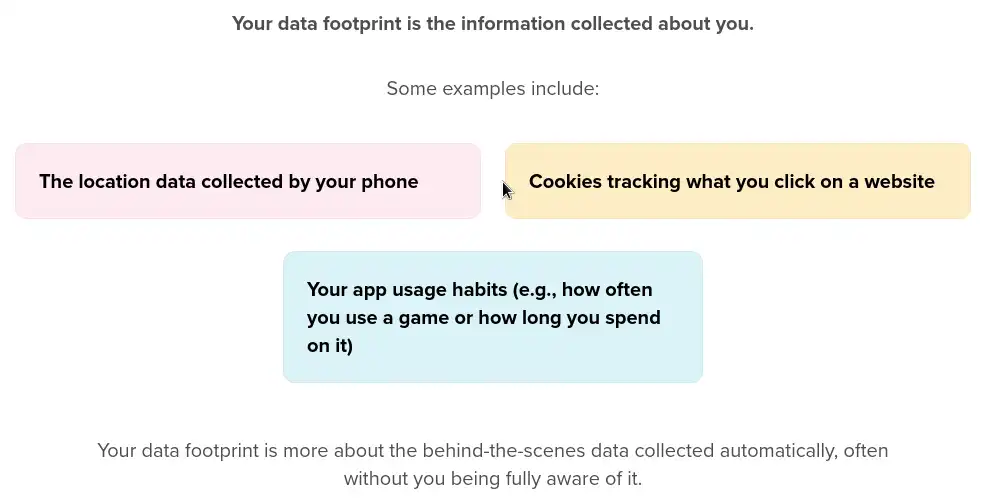
Figure 5: Activity from Module 8: Data Footprint.
In another activity in the same module, it is made clear that:
"Some websites or apps collect too much information, like your location or age, and might not protect it well making it easier for strangers or companies to know too much about you."
This message is sorely needed. Its impact is aided by the inclusion of an excellent video created by GlobalActionPlanUK, who are campaigning to stop big tech using surveillance advertising on children.
2. Guidance for Teachers
The Teachers Handbook is an excellent resource. It provides a wealth of useful information on each of the eight topic. This is a crucial component of the curriculum, given that most teachers are not tech experts themselves. Each chapter includes a step-by-step guide for how to conduct a lesson (Figure 6), definitions of key terms (Figure 7), and materials for all the student activities. It sets out a clear path from initial classroom discussion into the online activities, where much of the student learning takes place. A teacher using this curriculum would not have to do much planning to carry out any of the lessons. This, I'm sure, will be appreciated by the teaching staff.
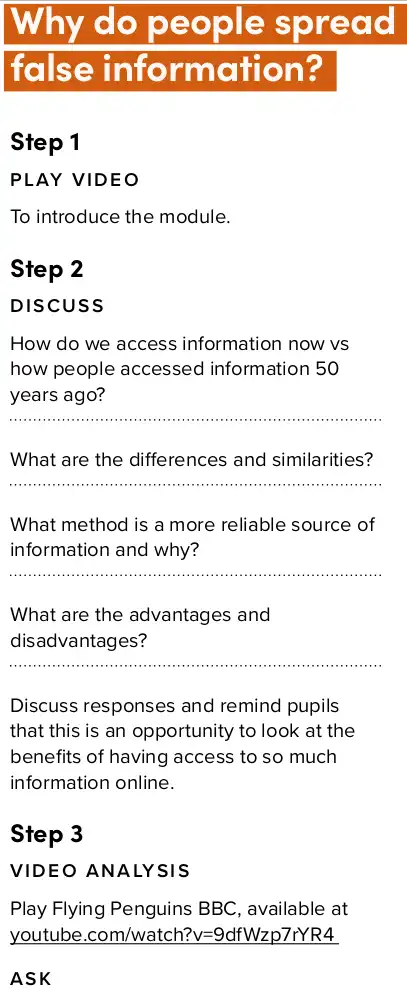
Figure 6. Step-by-step guide for a module 7.
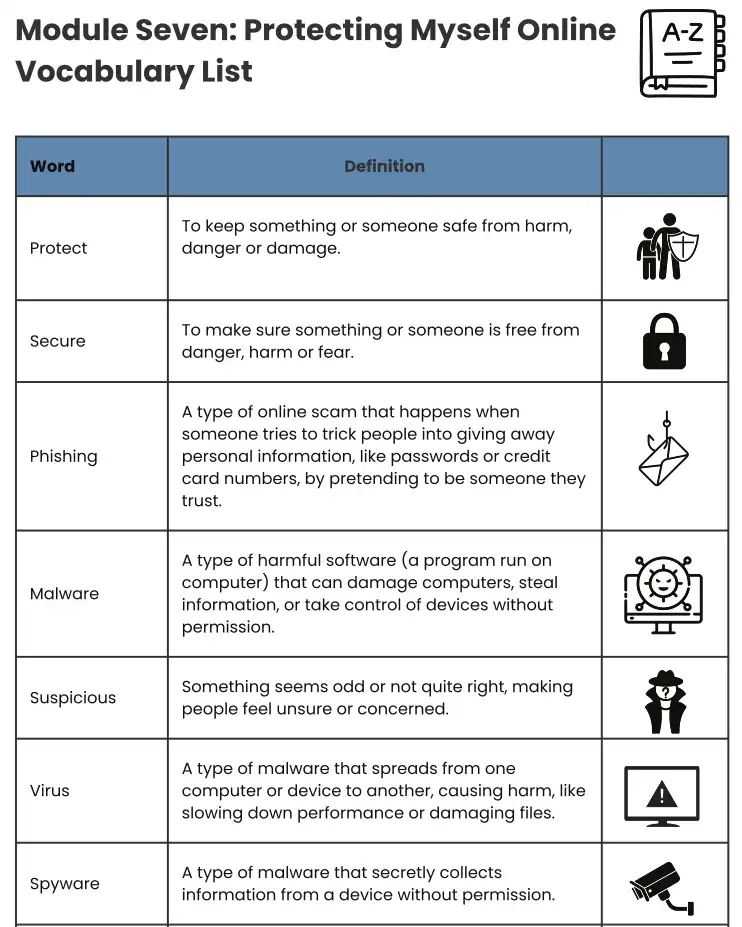
Figure 7. Some terminology from module 7.
3. Relevant Topics.
One of the difficulties in creating a curriculum on "online safety" and "digital citizenship", is that these subjects cover such a wide range of topics. There is a huge amount of material to cover and fitting it all in to one curriculum which needs to slot into an already packed 5th/6th class schedule is quite a monumental task. I think the eight modules covered on the course do a very good job of covering the scope of the subject matter.
While there are a number of additional topics that I would also include in such a curriculum for online safety, (e.g. tools to use to protect yourself online, understanding data storage and transmission), I think suggesting these types of improvements might be best addressed in the next section.
The Bad
1. No Practical Element
The greatest weakness of the course is the lack of any real practical application of the lessons. Students do not get the opportunity to put their new online safety skills to the test, leaving their newfound knowledge entirely theoretical. The Switched On curriculum is, at best, a surface-level awareness campaign.
For learning to be effective, putting theory into practice is vital. This is especially the case for cybersecurity, where awareness campaigns have time and time again shown themselves woefully inadequate in generating the desired behaviours. In a 2025 Oxford University study - Cyber Security Awareness Campaigns: Why do they fail to change behaviour? - the researchers state,
Changing behaviour requires more than providing information about risks and reactive behaviours...people must be able to understand and apply the advice.
Practical application of learning is a crucial component in effective education. To understand why, we can look to the field of educational research, where a huge amount of work has been done on exactly this topic. Over the years, many frameworks for maximally effective education have been proposed. Among them, I am personally fond of David Merril's '5 Principles' from his 2002 article - First Principle's of Instruction. Merril conducted a large-scale review of existing frameworks to identify commonalities, distilling his findings on effective instruction down to 5 principles, which are:
- Task/Problem-centred
- Activation (prior knowledge)
- Demonstration (show, don't just tell)
- Application (practice with feedback)
- Integration (transfer to real world)
The final two principles - Application and Integration - are the key steps for transforming theoretical knowledge into practical, real-world behavioural change.
I would like to illustrate how teaching online safety using Merril's framework could potentially be more effective than the Switched On curriculum. As there is no way to actually test this, I will have to leave you, the reader, to be the judge. We can use one of the topics covered and plan a lesson. I am going to choose passwords, as it an extremely important topic, and one where there is a large gulf between how I believe it should be taught and what is included in the course. Also, passwords is an area where everyone reading this will have some practical experience, and possibly also received some education on best practices.
In the Switched On Curriculum, the topic of passwords is covered in Module 7: Protecting Myself Online. This is an appropriate spot for this lesson, as cryptography is our greatest weapon against those trying to maliciously access our data. Therefore, it is crucial to get this right from the start (it is also very difficult to get people to change their password habits once they are ingrained!). In the module, the following advice is given:
Use Strong Passwords: Create unique passwords and don’t share them, even with friends.
Creating Strong Passwords & Use 2-Factor Authentication: Use a mix of letters, numbers, and symbols.
Use strong, unique passwords
This is the extent of the education on passwords. There are no activities on creating passwords, and no checks that what is being taught is being applied. However, at the end of the module, in the Have a Chat section, there is a link provided for children and parents to learn more on the Webwise site. This page is titled Creating Strong Passwords and it contains a few pieces of advice on the topic.
What is presented is disappointing. I am not going to focus on the fact that the page looks like it was thrown together in 5 minutes by someone who didn't even take the time to make the formatting consistent. I am only going to focus on problems in the advice it gives. First, it gives advice that is long outdated:
Try not to use dictionary words like ‘house’, ‘dog’ or even common phrases or expressions. These are easier to crack. Why not add some special characters to make them more secure.
For around a decade now, the use of passphrases - long strings of dictionary words, e.g. "house-white-over-reconnaissance-jacket" - has been recommended by cybersecurity organisations, including NIST (the National Institute of Standards). Long phrases of seemingly random words are much more difficult to crack than 8-10 character 'complex' passwords. As noted on a 2017 NIST article.
complex password rules actually drive us to create predictable, easy-to-guess passwords
Forcing people to use minimum 8 characters, uppercase, lowercase, number, and a special character has unwittingly created a small set to crack, e.g. "Password1!", "Willbrook8$", "Toyota5%". Rules on changing passwords every few months provide little further complexity, as we all just change a '1' to a '2' or a '!' to a '$' (see this Forbes report for more details on password habits).
The final piece of advice on the Webwise site on unpredictability is completely impractical. Here it is in full:
A random sentence could help you. For example: I once went to the zoo and saw a funny kangaroo. I can use the first or last letters out of each of the words in this sentence to create: iowttzasafk. I can then change some of these into special characters and numbers, add upper and lower case or even brackets, full stops or underscores in an order I am happy with: 1owTtza.5aFk. The great thing about this method is that it is unique to you and much harder to break. Just remember not to use the same password for more than two websites.
The resultant password - '1owTtza.5aFk' - is a strong password, but how many children are going to be able to remember the 11 word sentence, the rule for creating the password, and the further (seemingly random) rules for substituting numbers and special characters? Given that we are all estimated to have over 100 online accounts, and we need a unique password for each, this is completely unrealistic.
There is one other resource that is linked on this webpage called the Family e-Safety Kit. It is introduced as a tool to help younger children understand the importance of passwords. However, it's a malicious redirect...
A Security Aside
Ok, just a warning, I'm going to go on a little bit of a rant here. Over the past few months, in the process of doing research for Digital Knights, I have encountered a number of issues on the Webwise site that indicate a lack of technical expertise in the staff that create/maintain it. I wasn't going to include the complaints in this article because I felt it may be unfair to Webwise as a whole, e.g. the staff who create/maintain the website may not be the same people responsible for developing the Switched On curriculum. However, the severity of this particular problem evidences a lack of due diligence by the whole team.
The link I clicked on the Webwise site for downloading the Family e-safety Kit is a "malicious redirect". Instead of leading to a legitimate site called esafetykit.net, it instead it brings you to a site called bebas69online.org, which appears to be an Indonesian gaming platform. The site has been, in common terminology, "hacked". See video below of the redirect (you can try it yourself at your own risk):
These types of malicious redirects are common in phishing and scams, but rare on legitimate websites. The reason for the rarity on genuine websites is due to the difficulty of inserting code to achieve the redirect without access to either the host servers of the website, or the DNS servers (DNS servers are like the phonebook for the web). These resources should be locked down tight to make this cyberattack impossible. There should also be automated checks in place to ensure external links reach their intended target. This is web security 101 and it's not particularly difficult to carry out.
For a malicious link like this to exist and remain undetected on the website for a national body entrusted with keeping our children safe online is disgraceful. Due care and due diligence are very important concepts in cybersecurity, and this evidences that neither is happening at Webwise. Thank God this link only leads to a gaming website and not to one of the many other types of websites that malicious links tend to land. Unfortunately, while it redirects to a gaming website today, it could be something different tomorrow - these links have a habit of changing (I have emailed Webwise about this issue and will provide an update when I receive a response).
To be honest, I am not completely surprised that this type of serious issue is present. I had already noted several others problems prior to discovering this one. From surface-level design flaws, like the aforementioned inconsistent formatting, to more significant problems such as failed download links. In the video below you can see the take home PDFs for the Switched On project failing to load due to the error: "Missing env var". This means Webwise have not properly configured the site, or even checked it. This one particularly irked me because it's very tough to do research when you can't access the materials you are trying to review!
The real concern I have that arises from seeing these problems is that the people who are designing and developing the materials for keeping our kids safe online don't seem to be terribly good at doing it themselves. Their work often evidences a lack of knowledge of even the basics. I personally feel frustrated by this because I understand how people can look at a website and materials like these and automatically assume there must be experts behind them, but be ignorant of what the problems underneath show.
Ok, rant almost over. I will end on a positive note though... this is the type of stuff that motivated me to create the Digital Knights in the first place. In my talks with parents, many feel that their kids have already learned about online safety in school and don't really need to know much more. In these situations, I find myself hesitant to upset the parents' feelings of security. However, when I am confronted with the issues I've outlined in this article, it reminds me that we really need to do better, and I can play my own part by offering an alternative educational solution.
— End of Aside —
OK, back to Merril's educational framework and how to provide effective education on passwords that includes practical elements. Here's a very brief outline of a lesson based on the 5 principles:
Lesson Plan:
1. Task/Problem-centred
Show video of young people telling stories about having their accounts hacked. Include the negative outcomes that resulted.
2. Activation (prior knowledge)
Ask children what they know about passwords, where they are used. Explain terminology.
3. Demonstration (show, don't just tell)
Show the children the following table, revealing one line at a time. Ask the children to guess how long it would take a hacker to crack each password length before showing the answer.
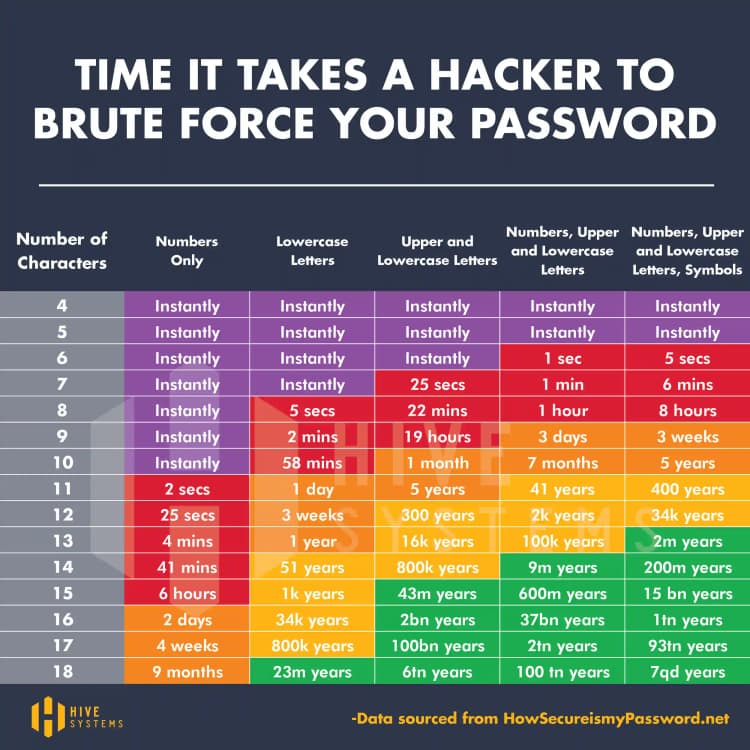
Figure 10. Time taken to hack Passwords in 2025.
4. Application (practice with feedback)
Give students a list of passwords, and ask them to use the chart to determine how long it would take to crack each (see examples below). Also make students aware of other concerns in password creation, like how memorable they are.
- password
- Password1!
- F0%£.do4*.Wwp
- leaf-concertina-roman-playing-sock-between
5. Integration (transfer to real world)
Ask children to think of 3 strong, unique passwords. Students should take turns to type these passwords into a tablet/computer with an interface that resembles common username and password inputs. This will be a simple, purpose built programme that only checks the complexity, and does not store or reveal the input password. Students will be given scores based on how strong the passwords are. For assessing authentic transfer to the real world, students will repeat this exercise at home at set intervals - the next day, week, and month - with further test to follow if needed.
I imagine you can see how the addition of the practical element means this approach would likely be significantly more effective than what is included in the Switched On curriculum. It would also enable us to test and measure whteher it is effective or not. The results from the password input exercises taken after the course would provide quantitative data on performance. These results are necessary for evaluating the success of the course, and then improving and optimising in future years.
Note: This example I have provided is not how I personally intend to teach the subject of passwords on the Digital Knights curriculum. Cryptography is far too interesting and fun a topic to glaze over with simple instructions like these. At its heart, cryptography is nothing more than secret messages using codes, something most kids love doing anyway. If you teach kids how to hide messages with passwords, and then some computational techniques for guessing passwords, they will learn very quickly to create strong and unique passwords by default. No instructions necessary. I would also ensure all my students know how to install, use and back up a secure password manager on every device.
This ends the first criticism of the Switched On curriculum. You might counter this by pointing to the aims of the course in the Teacher's Handbook, where it states:
The programme will raise pupils' awareness of how they can be active digital citizens in a variety of digital-related activity.
You could argue that the purpose of the curriculum is to "raise awareness", and therefore the practical element is not necessary. I would counter this in two ways. First, as previously noted, we have ample evidence that awareness raising is ineffective in this context. Second, the curriculum purports to do more than simply raise awareness. This is explored in the next criticism.
2. Vague & Misleading Assessment Criteria
The Assessment criteria for Switched On is vague and misleading. Found on page 20 of the Teacher's Handbook, the two-paragraph section includes the phrases
"...assessment is woven naturally throughout the learning experiences..."
and,
"Teachers gather rich insights into pupils’ progress by using
intuitive observations..."
I have used and developed many assessment criteria in my time, including for primary age students. I have also graded hundreds of essays from university students on assessment in education. When I see language like this, a little alarm bell goes off in my head. The reason is, this type of language, e.g. "woven naturally", often conceals ignorance and uncertainty.
I do understand that a number of the methods proposed align with recommendations for classroom assessments set out in the document Assessment in the Primary School Curriculum: Guidelines for Schools. Assessment itself, particularly for young children, and in subjects where there is no clear right or wrong answer, can be carried out in many ways. These can include methods like "gathering insights", and "capturing how they communicate".
However, we are dealing with older primary students dealing with, mostly, very clear right and wrong behaviours here: safe vs. unsafe. 5th and 6th class students are going to be receiving phones with internet access very soon. We don't so much need teachers "gathering intuitive insights" as we need 13 year olds who can reliably engage with technology in a safe and reliable manner. We need assessment that uses clear tasks and tests to check that what is being taught is actually being learned.
For the type of assessment needed on this topic, the criteria need to be clear and concise. A good model for this is the assessment for the OECD's Programme for International Student Assessment (PISA). The PISA tests are an international standard for measuring the educational performance of only slightly older, 15 year old students in mathematics, science, and literacy. Below is a selection from the 2022 assessment and analytical framework on assessing mathematical reasoning.
"Mathematical reasoning (both deductive and inductive) involves evaluating situations, selecting strategies, drawing logical conclusions, developing and describing solutions, and recognising how those solutions can be applied..."
The language in the PISA assessment uses action verbs to describe exactly what the students are expected to achieve, e.g. "evaluate", "describe", "select". Clear objectives make it possible to reliably assess learning. This is what should be mirrored in any curriculum for online safety.
A more serious criticism than the assessment criteria being vague, is that it is misleading. The Switched On assessment includes claims that students will be able to:
"apply this understanding to real-life situations"
and
demonstrate their understanding in authentic ways
This is not the case. I have already covered in detail in my first criticism the lack of any practical (real-life/authentic) element. Real life situations includes the child, alone, in their room, at night, on their own phone. There are no methods in the Switched On Curriculum to assess whether students are applying the lessons in authentic ways.
The assessment that is "woven naturally" into the learning experiences relies on contrived examples. This can be seen in the exercises the students are to complete. For example, in Module 2: Understanding Mis and Disinformation, students are shown a made up news story and asked to categorise it as 'True Story', 'False Context', 'Satire or Parody', 'Misleading Content' etc. (see Figure 11)
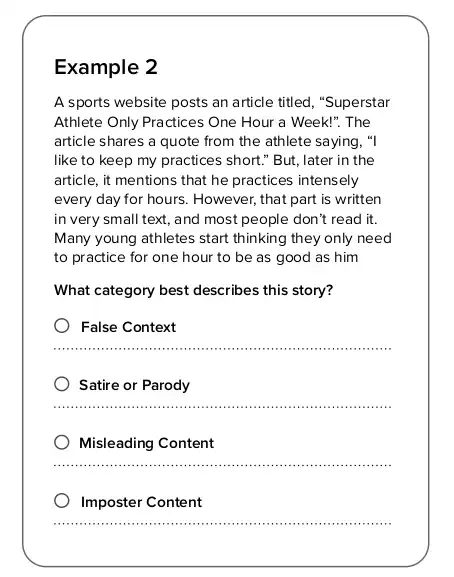
Figure 11. Student Activity Example from Module 2.
Now, one could argue that if a student can correctly categorise the stories in the exercises, then they are likely to be able to do so in real life. This may be true, but that is not a conclusion we can come to unless we actually test it. An alternative hypothesis could be that these exercises give children a falsely high evaluation of their own ability to accurately categorise online content. I can imagine a student who gets all these exercises correct believing this means they don't need to be terribly concerned about being fooled online. However, the tricks and tools used by content creators, advertisers etc. to make these types of false/misleading content are ever-evolving, and constant vigilance is necessary.
3. Lack of Depth
Earlier, I highlighted the breadth of the curriculum as a positive. In this section, I will turn to depth. There is a lack of depth in areas where the introduction of even a small amount of technical information could be hugely advantageous.
Take this snippet from Module 8:
Some websites or apps collect too much information, like your location or age, and might not protect it well making it easier for strangers or companies to know too much about you.
No examples of this are given. No explanation of the mechanisms by which information is collected. No means by which to actually protect yourself is taught.
I believe that we need to be frank and honest to kids about the digital landscape they are entering. It is one dominated by a small group of large tech companies that each have a long history of privacy violations. Your data is very valuable. The more companies know about you, the more money they can make from your profile. Take Google as an example (I'm only focusing on them because they have the most tracking - 75% of the popular websites). Google were fined $170 million for illegally collecting personal information from children on Youtube without parental consent, $314.6 million for transmitting user data from idle Android phones without permission, and have recently been making headlines in the cybersecurity world due to automatically downloading a 4GB AI model to users computers without consent.
I don't think we should shy away from informing children about the real details of the digital landscape. To use the analogy to sex education I have leaned on in previous writings, this approach is akin to telling children that there are diseases you can get from intercourse, but then not providing any information on what the diseases are, or any means by which to protect yourself.
The Teacher's Handout doesn't provide explicit reason for this approach. It only includes the following advice for educators:
Focus on online activities (e.g., “sharing photos”), not specific services or platforms
While this makes sense in some regards, e.g. the services and platforms on the 2026 version of this syllabus may be out of fashion, even non-existent in 2027, I think we need to be a bit braver in our collective push back against companies that repeatedly violate our privacy.
In terms of instructing children how to protect themselves against this type of threat, the only information provided in the curriculum is around informing students that they control settings, e.g.
"Remember you can restrict access to these features on your device to allow only when using the app, not at all or ask every time you want to use instead of allowing access all the time."
This isn't strictly true. If you use an Android phone, then Google has full access to everything on your phone (Same for Apple and iOS). This means they can access and share data without your say-so. In 2025 Google were fined $314.6million by a court in California for these types of unauthorised data transfers. Individual applications also tend to gather much more information than is needed for the app to function, and even more than is stated in their privacy policies. A study by privacy-focussed company NordVPN in 2023 found 42% of all apps ask for permissions outside what is necessary. A more recent 2026 academic study from researchers at the University of Rochester on logging activities of 1000 Android apps observed:
67.6% of apps leaking sensitive information not mentioned in their policies
It is important for us to explain to children why this is happening. Data is valuable. Your data is valuable. Every click, every scroll, every location. They all have monetary value. We need to teach them that their privacy also has value. They have a fundamental right to privacy - to not having their activities and behaviours tracked, stored and sold to the highest (or every) bidder. We also need to equip them with the tools and skills to protect themselves, so when they are alone in their room on their phone, they can really stay safe.
Summary
If you have made it this far, thank you very much for your attention. There was a lot to cover in this particular article! I hope you have found this review interesting and informative.
Overall, to sum up, I suppose I would say that at best, the Switched On Curriculum is a reasonable first draft at an awareness campaign for 5th and 6th class that sacrificed depth for breadth. Attempting to cover such a large topic within the strict limitations of time available to schools and the lack of technical expertise among teachers meant going beyond a simple awareness campaign was not faesible. The designers made every effort to provide educational materials that were easy to follow, and activities that could be done autonomously by students, and they should be commended for doing so.
However, on the other end, I would say that Switched On appears to be designed by people who do not have the level of technical and cybersecurity expertise that I would expect from those entrusted with developing a curriculum on the topic. They do not provide any means of effectively evaluating whether or not what is being taught is actually being learned and put into practice. There is a lack of any detail on many critical areas - how the internet works, how data is collected and used, tools for protecting yourself. Ultimately, this course only serves to provide students and their parents with a false sense of security, and this is a major concern.
I am concerned that the existence of the Switched On curriculum may result in complacency. Complacency that the children who complete the course know how to stay safe online and are prepared to become digital citizens. In my conversations with other parents on the topic of online safety, one mum said, "Oh they've already covered that in school. They had online safety week last month." They felt confident their child had already learned all they needed to be safe online in the few hours taken up by the activities that week.
I don't think the learning of online safety and digital citeznship takes hours. I don't even think it takes weeks or months. I think it takes years. I also think it should be taught by people with some expertise in technology and cybersecurity who can take learning beyond the awareness stage, into the hands-on, practical elements. I am putting together a curriculum to do just that. If you are interested, click the link and have a look.